
For details on locating the eRequest within native EMR integrations (QHR Accuro, TELUS PS Suite, TELUS Med Access and OSCAR EMRs), please refer to the 'View Your eReferral' step in the View & Track Your eReferral support article.
The below information refers to viewing the eFax eRequest within the Ocean Portal.
View the eFax within the Ocean Portal
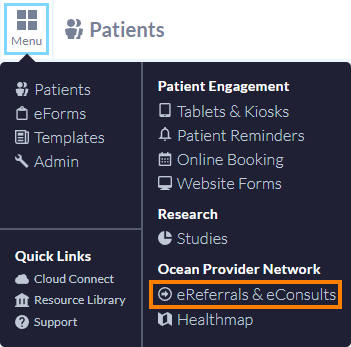
- In the Ocean Portal, open the Menu in the top left corner, and select ‘eReferrals & eConsults’.
-
The eFax eRequest is initially sent through to the Provincial Care Coordination Gateway (PCCG), which sends the eRequest to the fax machine for the indicated fax number.
At this time the eRequest will be found in the ‘Sent All’ and ‘Awaiting Response’ folders, with the Status ‘Sent via eFax’.
The eRequest will remain here until the PCCG sends a response back.

Delivery States
-
If the fax goes through successfully, the PCCG will transmit a ‘Status = Received’ message back to Ocean.
The referral will automatically move from the ‘Awaiting Response’ to the ‘Externally Managed’ folder, and the Status will update to ‘Received and Managed Externally via eFax’. The referral can also still be found in the ‘Sent (All)’ folder.
-

- Within the referral, in the Action menu, the Event Log will display a 'Received' entry showing the fax was successfully delivered to the recipient.
-

-
If the fax delivery fails, and the PCCG exhausts its attempts to reach the fax server, the PCCG will transmit a ‘Status = Delivery Failed’ message back to Ocean. This results in a technical decline.
The referral will automatically move from the ‘Awaiting Response’ to the ‘Needs Review’ and ‘Declined’ folders, and the Status will update to ‘Declined via eFax’. The referral can also still be found in the ‘Sent (All)’ folder.
-

-
A declination message will also be found in the referral view within the ‘Messaging’ pane.
The message will inform the sending site that the referral was automatically declined due to a technical delivery issue and could not be delivered, and the referral should be sent offline using business contingency practice’.
-

Note
eFax referrals are externally managed. Once the referral has been successfully delivered to the recipient site’s fax server, it is no longer updated within Ocean.
Any actions taken on the referral after this by the sending site (e.g. cancelling the referral, sending a message in the Messaging pane) will not be received by the recipient site.
Please refer to the ’An eReferral I sent has been marked as 'Externally Managed'. What do I do now?’ section in the What are 'Externally Managed' eReferrals? support article for more details.
Next Steps for a Declined eFax
Note: if your eFax eRequest is declined, you can optionally resubmit or redirect it.
- Resubmit (Last Recipient): used to resubmit the referral to the last recipient they were declined from.
- Redirect (New Recipient): used to initiate a new referral to a brand new recipient on the Ocean Healthmap, while reusing the patient demographic information and any attachments found in the 'Messaging' area of the original referral (does not need to be another eFax listing).
To resubmit or redirect an eFax Request, you can follow the typical workflow steps found in the How do I Resubmit or Redirect a cancelled/declined eReferral/eConsult? support article.
How long will the eFax/Referral be stored?
Referrals that are in the ‘Declined’ or Externally Managed’ terminal states will follow the standard archival rules. You can refer to How long are eReferrals and eConsults stored after they are sent through Ocean? for full details.