
As Ontario Health works toward province-wide integration of its care coordination system, some receiving sites are not yet able to receive electronic referrals. To ensure referrals can continue without disruption during this transition, Ontario Health is using electronic fax as an interim solution. This allows referrals to be sent in standard, clinician-readable formats until all sites are ready to fully adopt electronic referral capabilities.
Prerequisites
- Complete the Set Up Your Site to Receive eConsults and/or eReferrals guide.
- Receive confirmation that your Ocean Site has been configured for eFax — this is being coordinated by Ontario Health (OH).
1. Navigate to your Directory Listing Settings
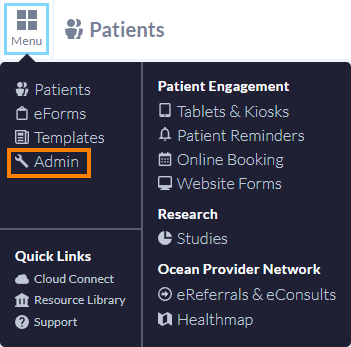
- After logging in to the Ocean Portal, open the 'Menu' and select 'Admin'.
- In the Admin Settings page, select 'Directory Listings'.

- In the Directory Listings page, click 'Edit' on the relevant listing.

2. Configure Your Directory Listing Settings for eFax
- In the ‘Listing Information’ tab, check off the ‘Mark this listing as an eFax listing’ checkbox. This checkbox option will display when the Ocean site has been enabled for eFax. Once this has been checked off, the 'eReferral button label' will default to 'Send eReferral via eFax'.

- In the ‘Listing Information’ tab, ensure there is a fax number entered. This becomes a mandatory field to ensure the eFax can be successfully delivered when the directory listing is configured for eFax.

- In the ‘Enablement’ tab, ensure you click the ‘Apply to Regional Authority’ button and follow the existing process of applying the listing to the Ontario Health eReferral Program Regional Authority.

- Click the ‘Save’ button to save your directory listing settings.