
Clinicians and clinic staff can complete an Ocean eForm on a patient's behalf from a clinic workstation.
Prerequisites
- Your site must have a Patient Messaging licence.
- Your site must be integrated with one of the following EMRs: TELUS PS Suite, TELUS Med Access, Accuro, OSCAR Pro.
This workflow can be helpful when:
- A patient is not comfortable completing forms by email.
- A patient did not complete a form before their appointment.
- A clinician wants to review the questions and complete the form with the patient during their appointment.
Complete an eForm on behalf of a patient
- Open the patient's chart and click on the Ocean logo in the toolbar. The Ocean custom form window opens.

- Forms that are already in the patient's queue will appear at the top of the window. If needed, add more forms to the patient's queue by selecting 'Add Form'. Then, click on the Ocean logo. This will bring you to the Ocean Patient Dashboard.

- Forms that are already in the patient's queue will appear under 'eForms'. If needed, add more forms to the patient's queue by selecting 'Add Forms'. Then, click on the name of form you want to complete under 'eForms'.

- Complete the queued eForm(s) in the browser.

- From the patient's chart in Med Access, click 'Launch'. Locate the Ocean extension and click 'View Patient' to launch the Ocean Patient Dashboard.

- Forms that are already in the patient's queue will appear under 'eForms'. If needed, add more forms to the patient's queue by selecting 'Add Forms'. Then, click on the name of form you want to complete under 'eForms'.
-
- Complete the queued eForm(s) in the browser.
-
- With the patient in context in Accuro, launch the View Patient Summary CDS link or button.
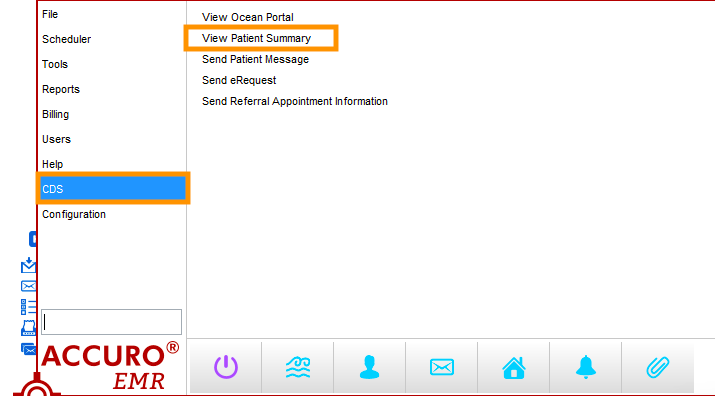
- Forms that are already in the patient's queue will appear under 'eForms'. If needed, add more forms to the patient's queue by selecting 'Add Forms'. Then, click on the name of form you want to complete under 'eForms'.
-
- Complete the queued eForm(s) in the browser.
-
- From the relevant patient's appointment on the schedule, click the 'Oc.' shortcut.

- Forms that are already in the patient's queue will appear under 'eForms for this patient'. If needed, add more forms to the patient's queue by selecting 'Add Forms'. Then, select 'Open Form Queue'.

- Complete the queued eForm(s) in the browser.
