
Early Access Feature
This article reflects the functionality available during the early release phase of reassigning referrals/consults. If you're interested in getting started, please complete this form.
The Most Responsible Provider (MRP) Reassignment feature allows users at the sending site to reassign an active referral/consult to another user on the same Ocean site.
This is useful when a referral/consult needs to be reassigned, such as when a clinician leaves the clinic and transfers care to another provider. Ocean preserves the original referring provider on the referral/consult while sending future updates to the reassigned MRP.
Reassign the Most Responsible Provider
- Start by logging in to the Ocean Portal.
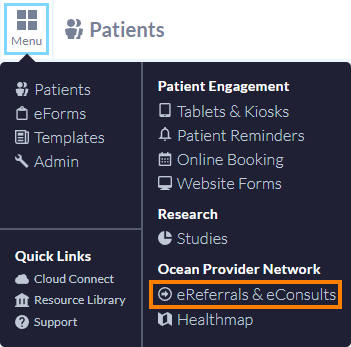
- Navigate to the eReferrals area by opening the 'Menu' and selecting 'eReferrals & eConsults'.
- Locate the eReferral that you wish to reassign by using the folder categories or the search bar. Open the eReferral by clicking on it.

- In the General section, select the 'Edit' icon next to the Most responsible sending provider field.

- In the Reassign Most Responsible Provider window, select the new MRP from the list of Physicians and Nurse Practitioners at the sending site.

- Select 'Save'.
Note: The Most Responsible Provider list only includes users with these roles: Family Physician, Nurse Practitioner, Resident, Specialist, or Other.
How Reassigning an MRP appears in eConsults & eReferrals
Expand the sections below to see how reassigning the MRP appears in Ocean.
The Clinician and Source columns on the eReferrals and eConsults page display the reassigned MRP.
- You can search for the referral/consult by the original referring provider or the reassigned MRP.
-


Note: If the original referring provider is removed from the site, any referrals/consults that were reassigned to an MRP do not appear under the "Users Removed from Site" filter because they are associated with the reassigned MRP.
- In the Messaging pane, the reassigned MRP appears as the recipient.

- Messages sent from the receiving site are routed to the current MRP.

Ocean sends future email notifications to the reassigned MRP instead of the original referring provider. For more information about Ocean email notifications, see Where do eConsult and/or eReferral notification emails get sent to?
- Patient email notifications also display the name of the reassigned MRP.

- The PDF displays both the original referring provider and reassigned MRP.

- The event log records who reassigned the MRP, who the reassigned MRP is, and when the reassignment occurred.
-


Within the analytic reports, the existing referring clinician fields remain unchanged and continue to represent the original sender. If an MRP has been reassigned, additional MRP fields are included in the analytics report. For a complete list of analytic fields, see the data dictionary in the Accessing eReferral Analytics article.