
When a Directory Listing is no longer in use, it should be configured such that the listing can no longer receive new eReferrals.
A Directory Listing can be deleted only after all associated eReferrals have been archived. For an eReferral to be archived, it must reach one of the following terminal states:
- Completed
- Declined
- Cancelled
- Externally Managed
After reaching a terminal state, an eReferral can remain in Ocean for up to 365 days before it is archived. Until all eReferrals have been archived, your Directory Listing can not be deleted, however, you can update the Directory Listing to prevent it from receiving new requests.
Inactivate the Directory Listing
- Log in to the Ocean Portal.
- Open the 'Menu' and select 'Admin'.
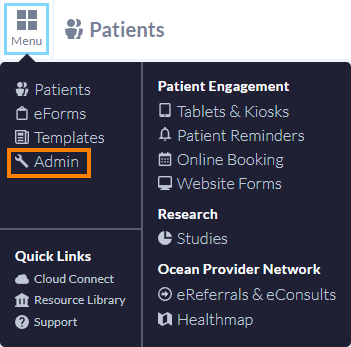
- Select Directory Listings.

- Find the Directory Listing you want to manage and click 'Edit'.

- In the Listing Information tab, set 'Will this listing accept eRequests?' to 'No'.

-
Open the Enablement tab and hide the listing from users on the Ocean Healthmap.
Select Enable test mode' and 'Hide this listing from users who are not using test mode'.

- Click 'Save Changes'.

The Directory Listing will no longer accept new eRequests, and the listing will be hidden from Healthmap users who are not using test mode.
Delete the Directory Listing
Once all associated eReferrals have reached a terminal state and have been archived, the Directory Listing can be deleted.
- Open the 'Menu' and select 'Admin'.
- Select Directory Listings.
- Locate the Directory Listing and click 'Delete Listing'.

For more information about managing listings, refer to "Directory Listings".