
Learn how to mark a referral as 'Completed' to close the loop on its lifecycle.
Once the scheduled appointment date for the referral has passed, you are able to mark the referral as completed.
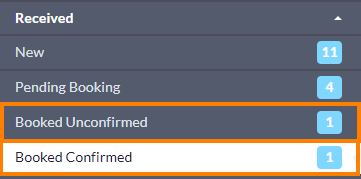
- Locate the referral within its current status folder. This is typically either the 'Booked Unconfirmed' or 'Booked Confirmed' folder.
-
-
Open the referral, and press the 'Completed' button at the bottom.
Note: If you have received the referral using Med Access, Accuro or OSCAR Pro, a final copy of the referral record will be automatically downloaded into the patient's chart in your EMR.
If you have received the referral using PS Suite and the 'Automatically Import Attachments to EMR' setting is enabled in your Cloud Connect configuration, a final copy of the referral record will be automatically downloaded into the patient's chart in your EMR.
For other EMRs, you can manually download a final copy of the referral record to your computer, or manually trigger an additional import of the eReferral into your integrated EMR using the 'Import to EMR' button in the Action menu.
-

- The referral will be automatically moved to the 'Completed' status folder.
-

Are referrals archived after they are moved into the 'Completed' status folder?
Yes, eReferrals are eventually archived after they are moved into the 'Completed' status folder. For specific details on Ocean's archival rules, refer to: How long are eReferrals and eConsults stored after they are sent through Ocean?
- If you would like to see the specific date that a referral is scheduled to be archived, you can click on the "Action" menu within the referral, and choose "View Event Log". The specific archive date will be displayed at the bottom of the event log.
