Logo
English (United States) Français
Submit a Ticket Sign in
  1. OceanMD
  2. Studies
  3. Studies FAQ

Can I change the column headings on my exported Ocean Study data?

Avatar
OceanMD Support
Edited July 31, 2018 20:37
Follow
  • Open your eForm in the Ocean eForm Editor.
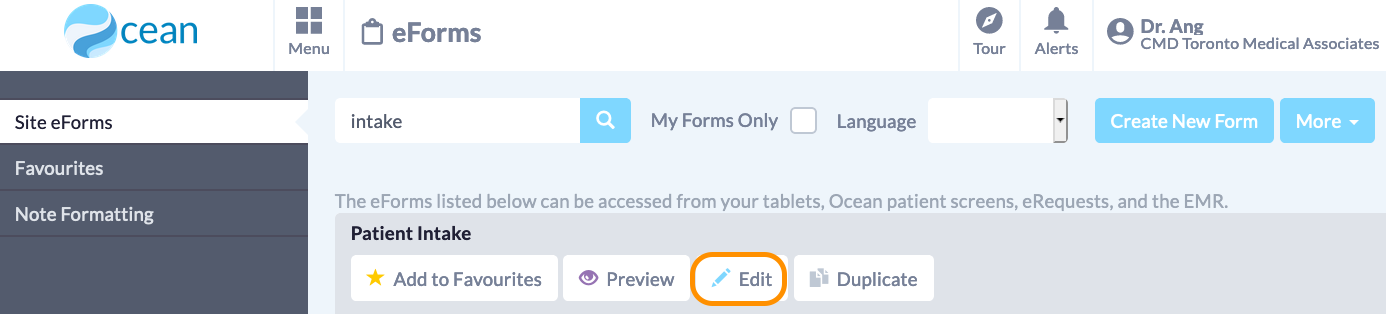
  • For each question, enter the "Scripting and More" tab.
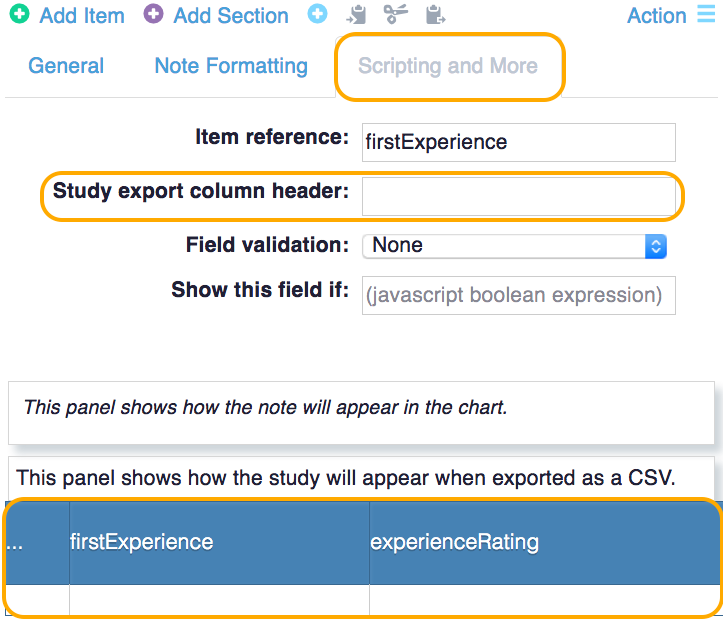
  • There, you can type in your preferred column header in the "Study export column header" field, which will override the item reference value in the study export.
  • You can preview your study export columns in the panel below.
Previous Article Next Article
Have more questions? Submit a request

Studies FAQ

At A Glance: Studies FAQ Read All FAQs View All Terms Return To Guide Return To Getting Started Guide Read All Articles
  • Can I delete individual study responses?
  • Who can access my research study data?
  • Can I run an Ocean Study without subscribing to additional Ocean services?
  • I changed one of my study forms and now I am getting emails telling me to export my data. Why is this happening and how do I make this message go away?
  • Can I change the column headings on my exported Ocean Study data?
  • How do I follow a participant across studies?
  • Can I export data from aligned studies in one spreadsheet?
  • What if I need to identify a patient from my study data?
  • How do I notify patients that my study has ended when they try to submit a response?

© 2024 OceanMD