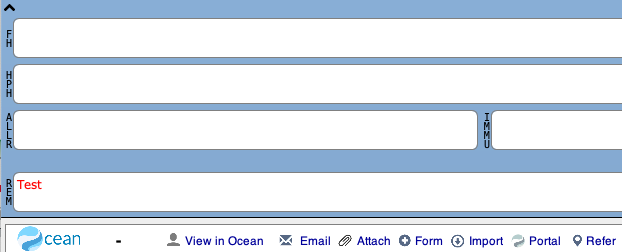
To set your Ocean Toolbar to be visible and available to use for all your patients, you'll want to create a reminder for the Ocean Toolbar custom form.
-
Open the Edit Reminders window in PS Suite.
- Open the EMR (Records) window within PS Suite.

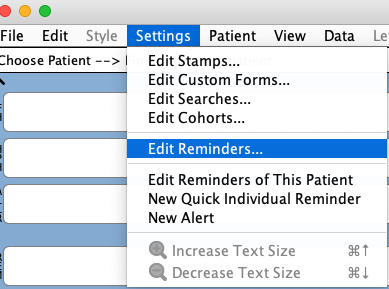
- Open the "Settings" menu and select "Edit Reminders".
-
Add a new reminder.
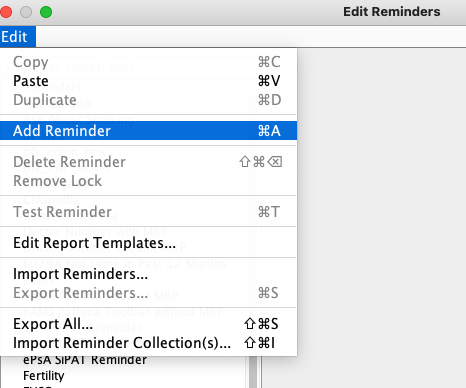
- In the Edit Reminders window, click "Edit" and select "Add Reminder".
- In the "Reminder Name" field, enter a descriptive name for the reminder such as "Ocean Toolbar".

- Click "Add Line" to add criteria to the reminder.

-
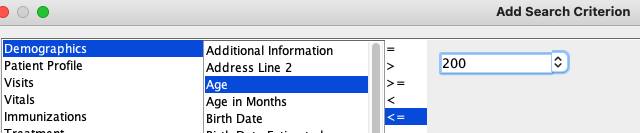
Specify the criteria that control when the Ocean Toolbar will display in a patient chart.
We recommend displaying the Ocean Toolbar in all patient charts, which can be configured by simply specifying a criteria which is true for all patients (e.g., the patient’s age being less than 200 years).
Alternatively, if you would prefer the toolbar to only be displayed in certain patient charts, you can indicate your preferred criteria.
- Enable the “Show Custom Form or Stamp” radio button and then select the Ocean Toolbar custom form in the dropdown menu.
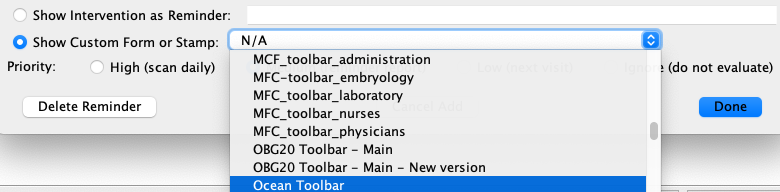
- Set the "Priority" value for the reminder to "Low".

- Click "Done" to save the reminder and close the dialog box.
- Open a patient chart to confirm that the toolbar is displayed below the CPP section.