
Overview
Ocean’s bilingual functionality across provider-facing areas of the platform allows users to toggle seamlessly between English and French. This enables providers and clinical staff across Canada to work in their preferred language—without disrupting how information is managed and shared across the system.
This article provides a detailed overview of what bilingual functionality means, why Ocean implemented it, how it works, and what to expect as a provider using the updated platform.
What is Bilingual Functionality in Ocean?
Bilingual functionality means that providers using Ocean can:
- View the Ocean platform (e.g., menus, buttons, labels) in English or French.
- Automatically receive system-generated materials (such as referral PDFs and provider-facing emails) in the selected language or in a bilingual format.
- Configure directory listings and forms with bilingual content.
- Communicate consistently with colleagues and patients who work in either language.
Where You’ll See Bilingual Features in Ocean
| Area | Bilingual Support |
|---|---|
| User Interface (UI) | Ocean can be displayed in your preferred language. A language toggle is available in User Settings, allowing seamless switching between English and French. |
| Ocean Healthmap | The Ocean Healthmap dynamically displays in the language you select. |
| Provider Emails | Both senders and recipients can configure email communications to be delivered in English, French, or a bilingual format. |
| Directory Listings | Directory listings can include bilingual listing names, descriptions, and Health Service Offerings (HSOs), allowing practices to present information in both languages where appropriate. |
| eForms | Form field labels and instructions can be configured individually to display in English or French. |
| Referral PDFs | Referral documents can be downloaded in either English or French. |
| Time Format for eReferral Appointments | Appointment times displayed in the scheduling dropdown within the referral form can be configured to use either a 12-hour or 24-hour clock format, depending on the language or preferences selected. |
How to Configure Bilingual Functionality
-
Users can access the My Account page to customize their language preference.
To open it, click your name in the top-right corner of the Ocean Portal to open the Account Menu. From there, select your preferred language to view Ocean in.
-


-
Switching Languages While Viewing the Healthmap
If you are already viewing the Healthmap and want to switch languages, use the English/French toggle located on the top bar of the Healthmap to change the display language at any time.
-

-
Viewing the Healthmap in French by Default
If you have selected French as your preferred language in your User Settings, the Ocean Healthmap will automatically launch in French.
How Sending Providers Update Their Language Settings for Email Notifications
- In the top right corner, select "Your Name" and click "My Account".

- Using the dropdown options next to Referral Email Language, you can choose between 4 options for receiving your eReferral email notifications. These options are receiving email notifications in English only, French only, Bilingual (English first) or Bilingual (French first)

How Receiving Providers Update Their Language Settings for Email Notifications
- Log in to the Ocean Portal, select 'Menu', and click 'Admin'.
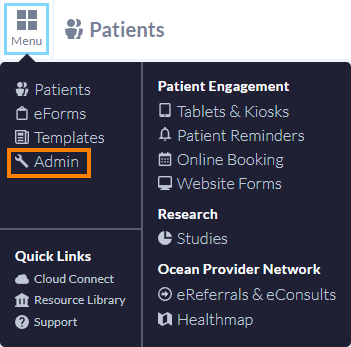
- Within the Admin Settings page, select 'Directory Listings'.

- Under the 'Listing Purpose' section, select which language(s) you would like to receive eRequest notification emails?

- Once you're satisfied with your Directory Listing configuration, click 'Save'.

There are 4 areas within your directory listing that support both French and English content: the Listing Name, Listing Address, Listing Description, and Health Service Offerings. To update these bilingual fields, follow the steps below:
- Log in to the Ocean Portal, select 'Menu', and click 'Admin'.
- Within the Admin Settings page, select 'Directory Listings'.
- In the 'Listing Name' field, enter a name for your Directory Listing (e.g., "Dr. John Smith" or "ABC Medical Clinic"). This name is publicly visible in the Ocean Healthmap. To make this listing bilingual, click "Add French"

- In the 'Contact Information' section, enter the clinic's address. To make this listing bilingual, click "Add French"

- In the 'Service Details' section, enter the 'Description'. To make this description bilingual, click "Add French"

- Navigate to the 'Health Service Offerings tab', enter the 'Offering Name' of your service. To make this description bilingual, click "Add French"

- Once you're satisfied with your Directory Listing configuration, click 'Save'.
Please see translating an eForm into another language(s) for more information.
If you've updated your language preference to view Ocean in French, your downloaded referral record will automatically be generated in French.
Please see Can I download a complete copy of the referral record? for more information.
Please see Update Your eConsult and eReferral Receiver Configuration for more information.