
PLEASE NOTE
The BC Lab eOrder Project has not yet been released.
Region-specific Functionality
Enabling licences for eOrder senders is currently only applicable in British Columbia.
Prerequisites
- Your Ocean Site must be configured as a Regional Authority by OceanMD.
- You must have Site Admin access to the Regional Authority Ocean Site.
To enable licences for eOrder senders on an Ocean Site, follow the steps below:
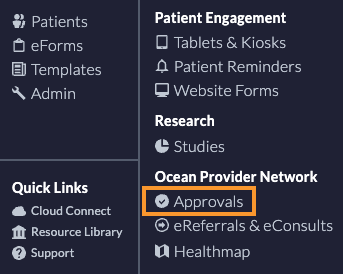
- Within the Regional Authority Ocean Site, open the Menu and select Approvals.
- In the Site Licence Approvals tab, locate the Ocean Site that you would like to validate and click Manage.

-
If the Ocean Site meets the approval criteria for your Regional Authority program's validation policy, select Enabled from the Enable Licenses for eOrder Senders dropdown.
The text will state how many authorized clinicians are being licensed on the site. Authorized clinician user roles include: Family Physician, Specialist, and Nurse Practitioner.

- Click Save.
- A new column will be added to the Regional Authority Site Licence Approvals page to track the number of licenses being used at a given site.

- A new column will be added to the RA export that will total the eOrder licenses that have been allocated.
